Creating a new page
ID: EBT-CEPC-NPIn Marketpath CMS a page is a publicly accessible and unique URL. Each unique URL, such as https://marketpath.com/features, is what we call a page. The following are all examples of pages:
- https://marketpath.com/ - our home page
- https://www.marketpath.com/blog/sixteen-ways-to-improve-your-local-seo - a blog post page about SEO
- https://www.marketpath.com/calendar/automation-zapier-demo - a calendar event page
- https://marketpath.com/contact - our general contact page
Every page in Marketpath CMS must be unique per domain. An error will be thrown if you try to create a page using an existing URL.
Has URL
To create a page for any content type that allows pages you click the Has URL checkbox, set the URL, and select a Template (Fig. 1).
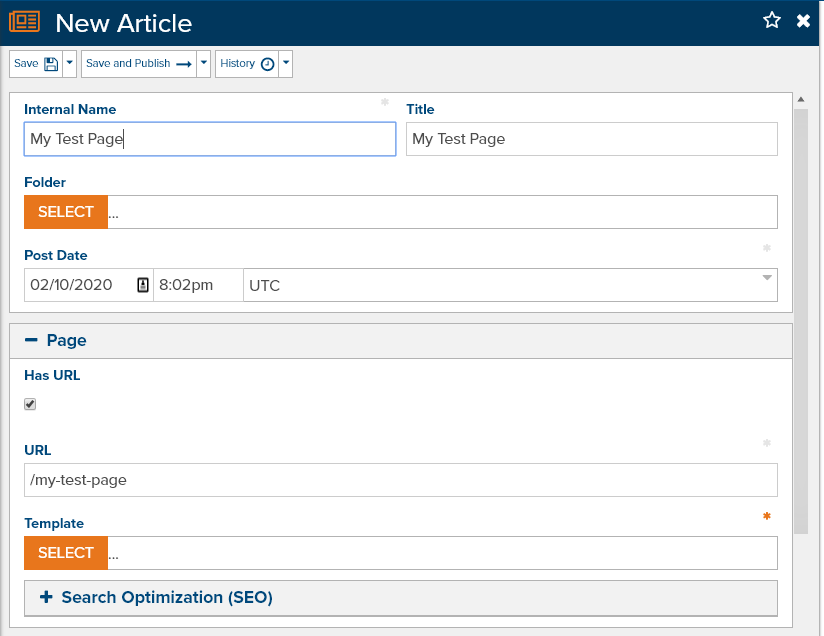
Fig. 1 - Creating a new page from an Article
For many content types, Has URL is selected by default. For others, however, you’ll have to explicitly select it. If Has URL is not selected then that object will not have its own publicly accessible page or URL on your website.
Create a New Page
The New dialog is template-first. Pick the template that matches the page you want (the object type is often inferred from that template). If only one parent exists for that type (for example a single blog or datastore), it is selected for you. You can also Create without a page when the object should not have a public URL, or Download more templates to install a package that provides them.
What you choose still depends on how your agency or developer built the site. They should have provided site-specific notes (see Site Instructions) that say which template to use.
Create a New Item
Click Create A New Item in the primary navigation, or go to Content > All Content and click New.
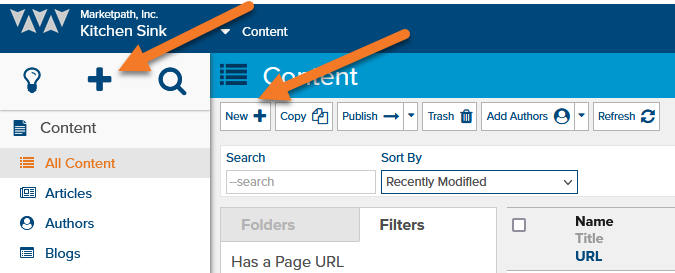
Fig. 2 - Create a new item
Select a template (or create without a page). Confirm Has URL is set if the object should be a public page, fill required fields, and save.
New from a content list
You can still create from a specific list. For a blog post, go to Content > Blogs, click Browse on the blog, then New (Fig. 4). The parent is already chosen; you still pick the template.

Fig. 4 - Browse for and create new Blog Posts
Selecting a Template
Templates define the layout of a page and are typically meant for specific page types, such as a Blog Post or a Datastore Item. When you create a new page, a template is required before you can save it.
Your agency or developer should label templates clearly and restrict them to the right types (and, for datastores, a Datastore Type when needed). If you are not sure which template to select, open an existing item similar to what you want and note the template it uses.
Feedback?
Please fill out the form below with your feedback or any questions you may have after working through the "Creating a new page" lesson.